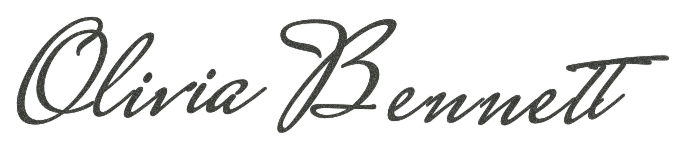
A free signature generator for your name: type it once and see it signed in eight handwriting styles, with real pen pressure and ink. Download your signature as a transparent PNG for documents, email and designs.
SignatureFlowing
Drawn in your browser. Your name is never uploaded.
See your name in cursive
Eight handwriting styles for the same name, from a fast flowing signature to neat school cursive. Pick one to see it large.
Signature ideas for your name
Many people sign with a shorter form of their name. Pick one to use it.
Tips for a good signature
Whether you copy a style by hand or use the image, these make a signature easier to recognize and reuse.
Do
Make the first letter of each name clear; the rest can flow
Sign the same way every time, so the signature stays recognizably yours
Keep it about as wide as a signature line, roughly 5 to 7 cm on paper
Use black or blue ink, which prints and scans well
Avoid
Long flourishes that run into other text on a form
Thin, faint strokes that vanish when the page is scanned
A style so ornate that it takes too long to sign by hand
An image where a document asks for a verified e-signature
How to make a handwritten signature online
1
Type your name
Your full name, your initials or the short form you sign with.
2
Pick a style
Compare eight signature styles side by side, then adjust the ink, the pen and the slant.
3
Download a PNG
The transparent PNG sits cleanly on documents, PDFs and email. The white version is ready to print.
Why it looks hand-signed
Signature fonts repeat every letter exactly. This cursive signature generator writes your name with a pen model: pressure changes along each stroke, letters vary a little, and the ink has grain, so the result looks like it came from a real pen.
Transparent PNG for documents and email
The PNG has no background, so it can go on a PDF, a letter, a slide or an email signature without a white box around it. Use the white version when you need a plain image or want to print it.
Is a generated signature legally binding?
This tool makes a picture of a signature. Whether a signature counts legally depends on the country and the document. For contracts, use an e-signature service that records who signed and when; for letters, email and designs, a signature image is what you need.
Questions about this tool
Is this online signature generator free?
Yes. This signature maker is free: every style and both PNG downloads, with no sign-up and no watermark.
Does the signature have a transparent background?
Yes. The transparent PNG has no background at all, so it can go over any page. The PNG on white is there for printing and for apps that don't handle transparency.
Can I use it to sign a PDF or Word document?
You can insert the PNG into a PDF editor or a Word document like any image. For agreements that need to be legally binding, use an e-signature service that verifies who signed.
How do I add a handwritten signature to my email?
Download the transparent PNG, open the signature settings in Gmail or Outlook, and insert it as an image. Keep it about 200 to 300 pixels wide so it reads well next to your name.
Which style makes the most realistic signature?
Flowing and Elegant look most like a fast, practiced signature. Classic is the neatest, close to school cursive, and Casual looks like everyday handwriting.
Can I make a signature with my initials?
Yes. Type your initials, or pick one of the signature ideas under the styles, which show your initials and shorter forms of your name in the style you chose.
Can I create a signature for a Chinese name?
Yes. Type the name in Chinese characters and the generator switches to three Chinese styles: running script, cursive script and brush.
Is my name saved or uploaded?
No. The signature is drawn in your browser, and your name is never sent to a server.